Create and share a buyer link
Create a private buyer link, share it directly, and follow the buyer’s progress.
Use the Buyers workspace to send a buyer a private link to their purchase pre-approval steps. The buyer can reopen the same link to continue after saving a step.
Save the buyer and property
Open Buyers, sign in, choose New buyer, and enter the buyer and property details. Select See estimate, review the numbers, then select Save and continue. Use Back to change the inputs before saving.
Create the link
In Send the buyer their link, select Create buyer link. If you want Kevo to send the email, check Also email the link to and confirm the displayed address before creating the link.
Share privately with the buyer
In Buyer link, select Copy and paste the link into a direct text or email to the intended buyer. If you created the link without emailing it, you can also select Email the link to when that button is available. A copied link has to be sent separately.
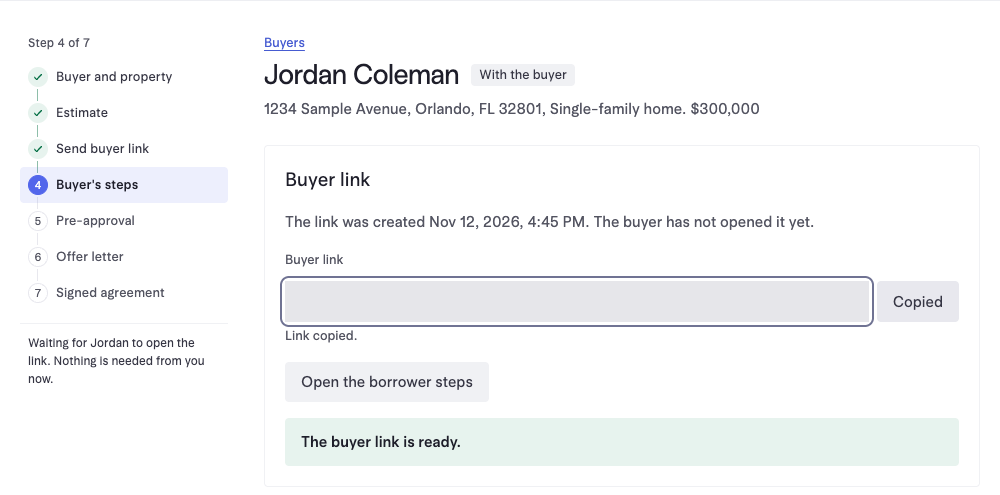
Keep the link out of group messages and shared documents. Anyone who receives the private URL can open the buyer steps.
Have the buyer open the link
The buyer starts by checking the property, purchase price, rent and down payment. They then complete identity and credit consent, review the credit check, add funds evidence and request pre-approval. Ask them to enter their personal details directly in Kevo.
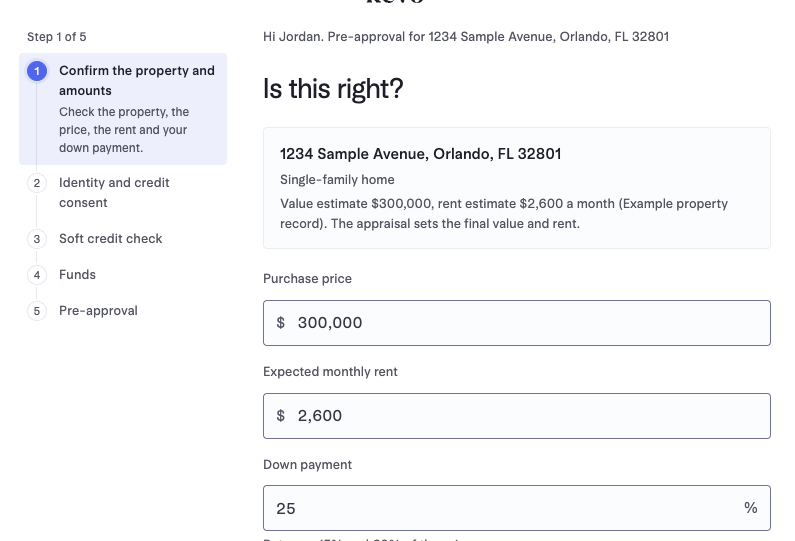
Reopen the buyer file from Buyers to check the progress rail and the Buyer link card. Use Copy to share the existing link again if the buyer lost it. Open the borrower steps opens the same buyer experience, so leave the buyer’s forms for them to complete. If Kevo shows an email failure or delivery remains unconfirmed, verify the address and share the copied link directly.